
OCI Network Firewall
Overview & Architecture of Oracle’s Next-Generation Cloud Firewall
Ahmed Hassan
6/17/20264 min read
OCI Network Firewall: Overview & Architecture of Oracle’s Next-Generation Cloud Firewall
As cloud architectures evolve, traditional firewalls alone are no longer enough to protect modern applications. Organizations need deeper visibility, stronger inspection, tighter segmentation, and automated protections against increasingly sophisticated threats.
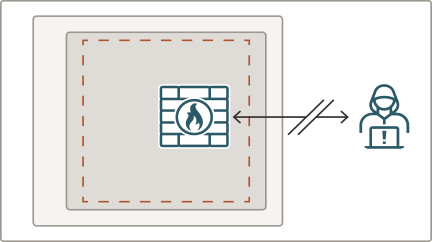
To address these needs, Oracle Cloud Infrastructure (OCI) provides the OCI Network Firewall, a fully managed next-generation firewall (NGFW) service powered by Palo Alto Networks technology. It integrates deeply into the OCI network fabric and adds advanced threat protection capabilities at scale.
This article provides a comprehensive overview of the OCI Network Firewall, how it works, its core components, and how it fits into modern cloud security architectures.
What Is the OCI Network Firewall?
The OCI Network Firewall is a cloud-native, fully managed, next-generation firewall service that provides:
Deep packet inspection (DPI)
Intrusion detection & prevention (IDS/IPS)
Advanced threat intelligence
URL filtering and application visibility
Malware and botnet protection
SSL/TLS encrypted traffic inspection
Granular app-level and user-level controls
Unlike traditional firewalls, it’s not a VM you deploy and manage it is a managed OCI service, scalable and ready to integrate into your networks with minimal operational overhead.
Where the OCI Network Firewall Fits in Your Architecture
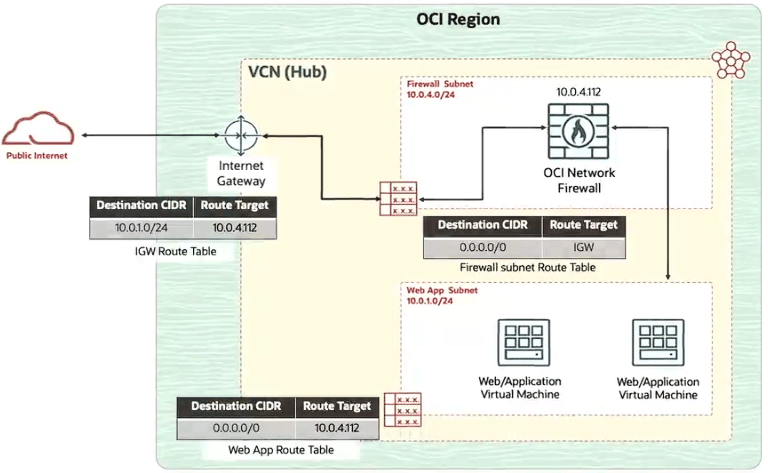
The network firewall sits between your private networks and external or internal traffic flows. It can be inserted in multiple scenarios:
Egress Traffic (Outbound)
Inspect traffic leaving the VCN and flowing toward the internet.
Ingress Traffic (Inbound)
Filter and protect traffic entering from the internet.
East–West Traffic (Internal)
Secure communication between private subnets, application tiers, or VCNs.
Service-to-Service Control
Control and inspect traffic between microservices or application components.
In all cases, the firewall provides policy-based, identity-aware, threat-intelligent inspection of packets passing through the VCN.
Architecture of the OCI Network Firewall
The OCI Network Firewall architecture consists of several layers that work together to deliver strong protection.
Let’s break them down
1. Policy Engine
This is the core logic that defines what is allowed and what is denied based on:
Applications
Users
URLs
Signatures
Threat categories
File types
Wildfire ML analysis
The policy engine supports:
Layer 3 and Layer 4 controls
Layer 7 application identification
URL categories and dynamic filtering
Threat profiles (malware, phishing, C2 traffic)
Policies are applied to specific firewall instances or groups.
2. Threat Intelligence & Signatures
OCI Network Firewall integrates Palo Alto’s global threat intelligence feeds:
Malware signatures
Intrusion prevention signatures
Command and control (C2) indicators
Unknown threat indicators (via ML analysis)
The system updates itself continuously, ensuring that new threats are blocked within minutes.
3. Deep Packet Inspection (DPI)
The DPI engine inspects the entire packet payload, not just headers.
It examines:
HTTP/S requests
DNS queries
Encrypted and unencrypted traffic
Application-layer data
File transfers
API requests
This enables detection of:
Hidden malware
Obfuscated payloads
C2 callbacks
Injection attempts
Malicious file downloads
4. SSL/TLS Interception
This allows the firewall to inspect encrypted traffic.
Capabilities include:
TLS handshake inspection
Certificate validation
Decryption and re-encryption
Policy-based selective decryption
This is essential because over 90% of modern attacks attempt to hide inside encrypted SSL tunnels.
5. Logging, Monitoring & Analytics
Every action is logged:
Allowed connections
Denied connections
Threats detected
Applications identified
URL categories accessed
Logs can stream to:
OCI Logging
SIEM solutions
Cloud Guard
External syslog collectors
This supports compliance, auditing, and incident response workflows.
Deploying OCI Network Firewall "Common Topologies"
You can deploy the network firewall using one of three common architectures.
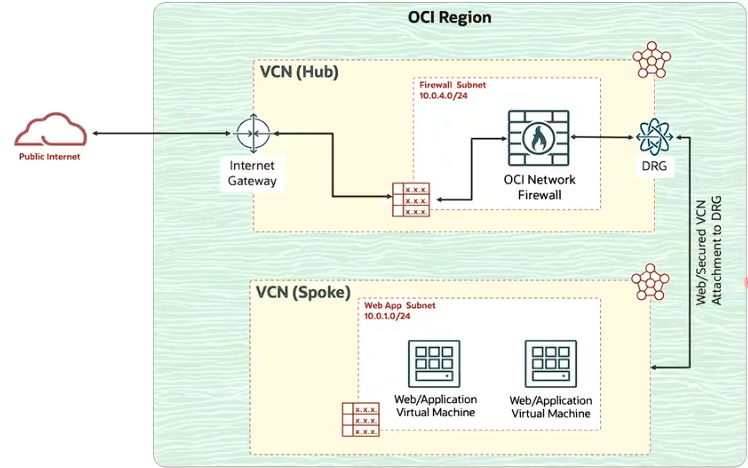
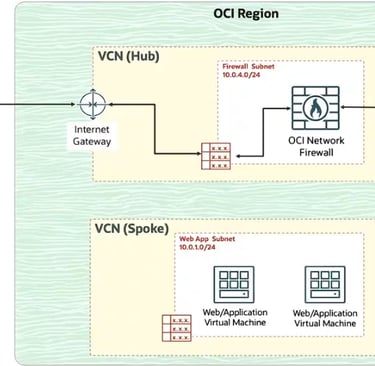
1. Centralized Firewall (Hub-and-Spoke Architecture)
Spoke VCNs → Hub VCN (Firewall) → Internet / On-Prem / Other VCNs
Suitable for:
Large enterprises
Multi-environment architectures
Shared service models
Benefits:
Centralized management
Consistent security policies
Reduced footprint in each VCN
2. Distributed Firewall Deployment
Firewall instances deployed directly in each VCN.
Useful when:
Each application requires isolated policies
Regulatory compliance requires local enforcement
Very high throughput is needed per application
3. Inline Security Between Application Tiers
Firewall placed between tiers:
Web Tier → [ Firewall ] → App Tier → [ Firewall ] → DB Tier
This enhances security for:
Critical workloads
Financial and healthcare systems
Zero Trust architectures
OCI Network Firewall Policies
OCI Network Firewall provides powerful next-generation protection for workloads — but its true strength lies in how you design and apply policies. Policies define exactly what traffic is allowed, denied, decrypted, inspected, logged, or blocked.
OCI Network Firewall policies can:
Allow or block traffic
Inspect packets
Scan for malware or intrusion attempts
Analyze encrypted TLS connections
Filter web categories
Apply application-based controls
Enforce threat prevention profiles
These policies are applied to firewall instances, which then enforce them on traffic in real time.
Types of OCI Network Firewall Policies
OCI Network Firewall supports multiple policy types. Each serves a different role in traffic inspection.
Let’s break them down:
1. Application Rules (App-ID Policies)
These policies identify traffic based on the actual application, not the port or IP.
Examples:
Allow: HTTPS traffic for Office365
Deny: SSH traffic from unknown sources
Allow: GitHub over HTTPS
Block: Unknown TCP/UDP applications
Why it matters
Attackers often hide malicious traffic inside allowed ports (like TCP 443).
App-ID policies expose these hidden signatures.
2. URL Filtering Policies
The firewall uses URL filtering to categorize websites and block harmful or unwanted categories.
URL categories include:
Malware
Phishing
Gambling
Adult content
Unknown/unclassified sites
Social media
File-sharing
Command & Control (C2)
Why it matters
Over 85% of modern attacks rely on websites and URLs for delivery.
Blocking unsafe categories is an essential defense.
3. Threat Prevention Policies (IPS/IDS)
These policies detect and block:
Exploits
Malware
Known attack signatures
Buffer overflow attempts
SQL injection
Remote code execution attempts
Botnet traffic
C2 callbacks
Why it matters
This is where the Palo Alto security engine shines.
Threat signatures are constantly updated globally.
4. SSL/TLS Decryption Policies
Encrypted traffic inspection is crucial because 90% of attacks hide behind HTTPS.
Decryption policies determine:
Which traffic to decrypt.
Which traffic to skip.
Which certificates are trusted.
You can configure:
Forward proxy for outbound traffic
Inbound inspection for traffic to servers behind load balancers
Why it matters
Without decryption, malware and C2 traffic can bypass detection.
5. File Blocking & Malware Analysis (WildFire)
Network Firewall can block:
EXE
DLL
Scripts
ZIP
PDF
JAR
Unknown files can be sent to WildFire (cloud analysis engine) for behavior analysis.
Why it matters
Stops malware before it reaches your workload.
6. Security Profiles
Security profiles combine multiple protections:
Anti-virus
Anti-spyware
Vulnerability protection
URL filtering
File blocking
DNS security
Profiles are attached to policies for layered protection.
Think of them as “bundles” of protections applied to matching traffic.
7. Policy Rulebase (The Master Control Layer)
The rulebase is an ordered list of rules.
Each rule specifies:
Source
Destination
Application
URL category
User (optional)
Profile
Action (allow, deny, drop)
Logging options
Rules are processed top-down; first match wins.
Conclusion
OCI Network Firewall brings advanced security capabilities to Oracle Cloud by combining deep packet inspection, identity-aware policies, SSL inspection, threat intelligence, and full management simplicity. It secures traffic across ingress, egress, and east–west flows while fitting naturally into modern Zero Trust architectures.
Whether you’re protecting a simple application or a complex enterprise network, OCI Network Firewall provides the advanced features needed to safeguard your workloads from evolving threats.
© 2026. All rights reserved.
Stay Updated
Get the latest posts on OCI and cloud tech