
OCI Certificates Service
OCI Certificates Service: A Complete Overview of Managing TLS/SSL Certificates in Oracle Cloud
Ahmed Hassan
6/18/20263 min read
Overview of Managing TLS/SSL Certificates in Oracle Cloud
There are few things in infrastructure management more frustrating than a sudden application outage caused by a lapsed SSL certificate. We’ve all been there: an overlooked expiration date on a random backend server brings down a critical API endpoint, sending everyone scrambling for private keys and manual renewals.
While securing data in transit across user traffic and internal microservices is a baseline requirement today, managing the sheer volume of those certificates manually is an operational trap. That is where Oracle Cloud Infrastructure’s (OCI) Certificates Service comes in. It’s a fully managed platform designed to take the manual babysitting out of TLS/SSL lifecycles
Let’s dive into how it works and how you can use it to automate encryption across your cloud environment.
What Is the OCI Certificates Service?
OCI Certificates is a fully managed certificate authority (CA) and certificate management service that helps users:
Issue private TLS/SSL certificates
Import existing certificates
Manage certificate renewal
Automate rotation
Store CA hierarchies
Apply certificates directly to OCI services (LB, API Gateway, etc.)
It enables secure communication between clients and services without manual certificate management overhead.
Why Do Certificates Matter?
TLS/SSL certificates provide:
Encryption: Protect data in transit
Identity verification: Confirm the server is who it claims to be
Integrity: Prevent tampering and man-in-the-middle attacks
Without trusted certificates, applications become vulnerable to interception and impersonation.
OCI Certificates simplifies this end-to-end.
Key Capabilities of OCI Certificates Service
Let’s break down the main features.
1. Certificate Creation
You can create certificates in multiple ways:
Private certificates (issued by OCI private CA)
Ideal for internal services
Perfect for microservice-to-microservice encryption
Used for secure internal APIs
Imported certificates
Bring your own TLS/SSL certificates from:
DigiCert
Let’s Encrypt
Entrust
On-premise PKI
CA hierarchies
Create:
Root CA
Intermediate CA
Leaf certificates
All within OCI.
2. Automatic Certificate Renewal
One of the biggest operational challenges is maintaining certificate renewals.
Expired certificates can cause outages and security risks.
OCI can:
Automatically renew certificates
Automatically update the load balancer
Automatically deploy the new certificate
No manual work, no risk of downtime.
3. Full Integration with OCI Services
OCI Certificates INTEGRATE directly with key Oracle services.
Common integrations:
Load Balancer
API Gateway
Reverse Proxy setups
Ingress controllers (OKE)
OCI Network Firewall
Service Mesh (future microservices)
This makes deployment simple and centralized.
4. Secure Storage of Certificates
All keys and certificates are stored in OCI Vault using:
FIPS 140-2 Level 3 HSMs (Hardware Security Modules)
Strong encryption.
Strict access controls.
Security is guaranteed by OCI Vault Service.
5. Certificate Lifecycle Management
Certificates have multiple states:
Created
Active
Pending rotation
Revoked
Expired
OCI automates management, visibility, and alerts.
You can:
Revoke compromised certificates
Rotate certificates regularly
Maintain CA hierarchies cleanly
6. mTLS (Mutual TLS)
OCI supports mutual TLS authentication, where:
The client verifies the server
The server verifies the client
Useful for:
Microservices
Service-to-service communication
Zero Trust internal environments
Mutual TLS ensures trust on both end
How Certificates Work in OCI (Simple Flow)
Create or import certificate
Store securely in OCI Vault
Assign certificate to:
Load Balancer
API Gateway
Custom endpoint
Traffic is encrypted end-to-end
Renewal triggers automatically
New certificate deployed with zero downtime
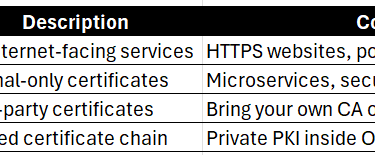
Types of Certificates You Can Manage in OCI
Security Benefits of OCI Certificates
No manual key storage
No risk of leaving private keys on compute instances
Automatic CA best practices
Reduced human error
Secrets stored in HSM-backed Vault
Automatic expiry notifications
Fine-grained IAM access control
Auditing for every certificate action
This significantly reduces the risk of certificate-based outages or breaches.
Deployment Scenarios
1. Secure Web Applications
Attach certificates to:
HTTPS load balancers
API endpoints
Reverse proxies
2. Microservice Encryption
Use private certificates with:
OKE clusters
Internal service meshes
Backend API communication
3. Internal Enterprise PKI
Fully controlled root + intermediate CAs hosted in OCI.
4. Zero Trust Architecture
mTLS for identity verification between workloads.
5. Hybrid Cloud
Use OCI Certificates with:
On-premise systems
External CAs
Multi-cloud configurations
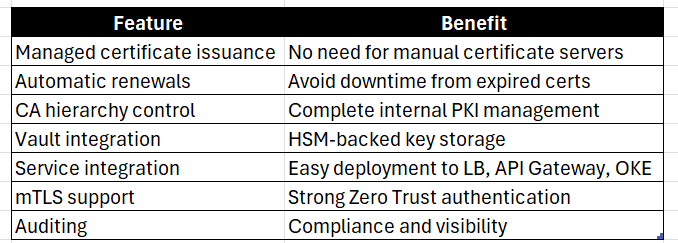
Benefits Summary
Conclusion
Centralizing your certificate management isn't just about checking a security compliance box; it's about making your day-to-day operations smoother. While OCI Certificates plays incredibly well with native services like API Gateways and Load Balancers, the real win is the automation. My recommendation? Start small by migrating a single internal microservice to an OCI private CA, test out the auto-renewal flow, and see how much manual overhead it cuts out for your team.



© 2026. All rights reserved.
Stay Updated
Get the latest posts on OCI and cloud tech