
OCI Billing and Licensing
An Architectural Guide to Billing, Cost Management, and Licensing
Ahmed Hassan
7/13/202611 min read
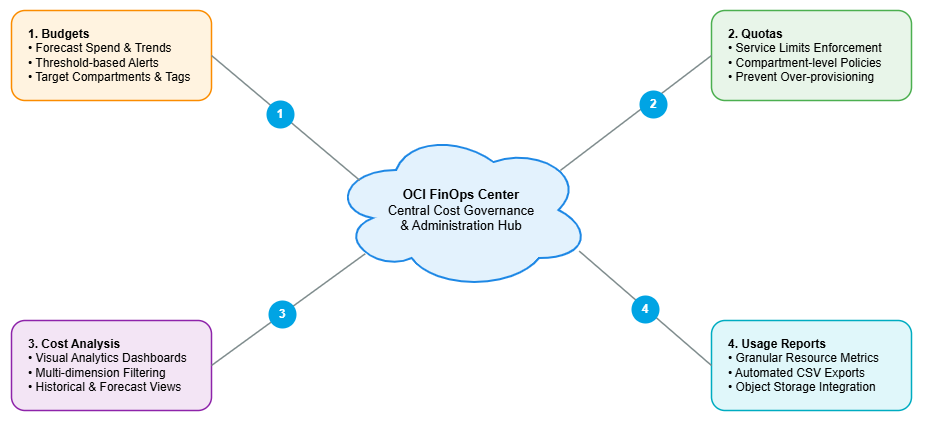
As organizations scale their cloud footprints, understanding the economic and regulatory frameworks of their provider becomes as critical as mastering the underlying technical architecture. Oracle Cloud Infrastructure (OCI) offers a highly predictable, performance-oriented cloud platform, but maximizing its value requires a deep understanding of its billing mechanisms, observability tools, and flexible licensing models.
This guide provides an authoritative analysis of OCI billing architectures, enterprise cost management strategies, and core licensing frameworks. It is designed to equip cloud architects, IT financial managers (FinOps), and enterprise decision-makers with the insights needed to optimize spend and maintain compliance.
Where Cost Comes From: Budgets, Quotas, and the Usage Ledger
Nothing in OCI's billing story starts with an invoice. It starts with a usage database. Every service in the platform- compute, storage, networking, database- continuously reports what it's doing into a shared usage ledger for your tenancy, and OCI translates that ledger into a cost ledger behind the scenes. Budgets, cost analysis, and quotas are all just different lenses pointed at that same underlying stream of data.
OCI budgets provide reactive governance across an enterprise tenancy. Evaluated approximately every hour, the billing engine compares actual and forecasted spending against defined thresholds, triggering automated email alerts when boundaries are crossed.
Budgets are applied to logical targets within the tenancy:
Compartments: The primary organizational boundaries used to isolate cloud resources for access control and cost tracking.
Cost-Tracking Tags: Key-value pairs attached to infrastructure at provision time. While OCI restricts cost-tracking tags to 10 keys per tenancy, this is highly scalable in practice. Architects should use broad keys (e.g., 'Department' or 'Project') and leverage the values to achieve fine-grained differentiation.
Subscriptions & Child Tenancies: Used for broader organization-wide cross-tenancy governance.
One thing is worth sitting with, because it changes how you should use budgets in practice. There's no feedback loop from a budget back to the services generating the cost. A budget alert doesn't pause a compute instance, doesn't block a new volume from being created, doesn't touch the resource at all. It's purely reactive, a notification rather than a brake. If nobody reads the email, spend keeps climbing exactly as it would have anyway.
Quotas are the actual brake. A quota is a hard, customizable limit set at the compartment level that constrains what can be provisioned in the first place, a genuine ceiling rather than a warning light. Any engagement where overspend isn't just undesirable but genuinely unacceptable, a fixed-price public sector contract, a startup with three months of runway, should have quotas doing the real enforcement, with budgets riding alongside for visibility. Treating budgets as if they were quotas is one of the more common gaps I run into during cloud landing zone reviews.
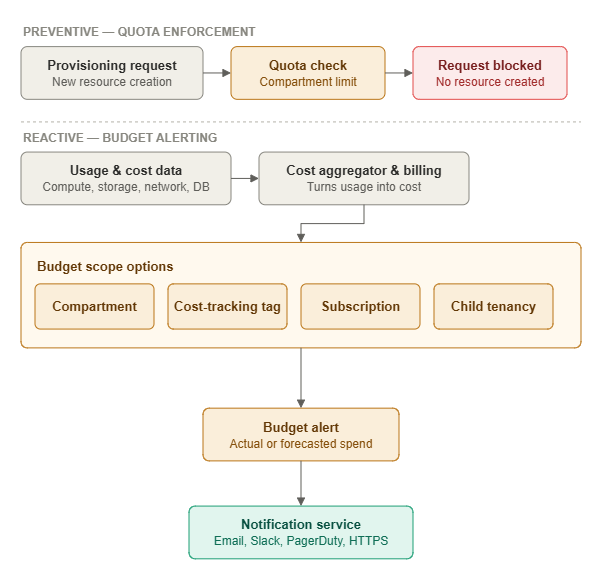
Top lane (preventive): a provisioning request hits the quota check and gets hard-blocked before any resource or cost ever exists. Nothing here touches the billing pipeline.
Bottom lane (reactive): usage and cost data (one unified source, not two) feeds the aggregator, gets evaluated against one of the four real budget scopes, and only then produces an alert and a notification, correctly labeled with the protocols OCI actually supports.
Visualizing Spend with Cost Analysis
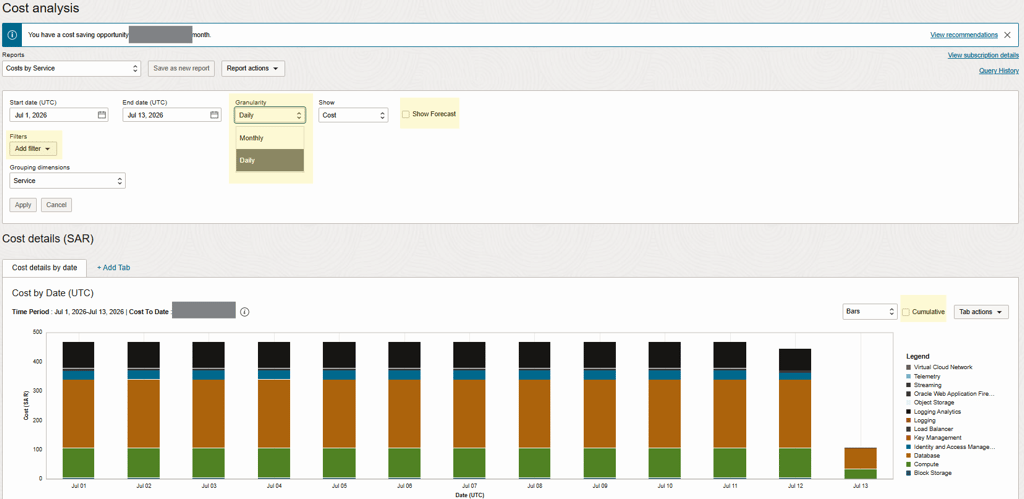
Once usage and cost data exist, the next question is how to actually look at it. Cost Analysis is OCI's built-in tool for querying those same ledgers and rendering them as charts, and it answers the questions people actually ask rather than requiring custom tooling for basic visibility. What's monthly spend broken out by service? What's the projected daily spend for a particular compartment? How much compute is one team's environment consuming, separate from everyone else's?
The OCI Cost Analysis engine allows teams to run multi-dimensional queries against the consumption ledger to generate granular visualizations. These reports are highly customizable across several core dimensions:
Granularity and Bounds: Reports can be filtered by specific start and end dates, with time intervals set to either daily or monthly increments.
Show Metric: Toggle views between absolute financial cost or raw capacity usage.
Grouping Dimensions: A powerful feature that breaks down aggregate spend by attributes such as compartment, region, or specific service type.
Advanced Filtering: Allows multi-variable combinations such as isolating a 'Dev' compartment to display only its combined compute and block storage costs.
There's also a forecast option worth understanding precisely, because it's easy to confuse with budget forecasting and the two don't share the same math. Cost Analysis projects forward using exponential smoothing, which weights recent data more heavily than older data. Budget alerts forecast using linear extrapolation instead, a straight-line projection from the current trend. On a workload with steady, predictable growth the two will roughly agree. On anything spiky or seasonal, they can diverge, and it's worth knowing which one you're looking at before acting on it.
Save a configured report and OCI keeps it live against fresh data going forward, so it becomes a dashboard rather than a one-time snapshot. For the rare case where even a well-built report can't answer the question, the raw usage data underneath is downloadable, with its schema documented in OCI's own reference material. Realistically, most cost questions never need to go that deep.
Compute Pricing.
Compute cost on OCI breaks down into four variables: shape, size, time, and capacity type. A fifth factor, OS licensing, matters mainly for Windows workloads and gets covered later in this article's licensing section.
Shape sets the overall machine configuration: processor family (Intel, AMD, Ampere), virtualization model (VM or bare metal), generation (E3, E4, E5, E6), and any specialized optimization the shape is built for (HPC, GPU). This is fundamentally an architecture decision rather than a pure cost-operations one, so it sits outside what this article covers in depth.
Size is measured in two dimensions.
Memory is exactly what it sounds like.
OCPUs require a short technical detour, because getting this wrong is one of the more common mistakes in cross-cloud cost comparisons.
An OCPU on OCI always refers to a physical core, regardless of architecture. That isn't an arbitrary choice. It reflects how OCI virtualizes compute in the first place. OCI carves up CPU capacity at the physical core boundary, which buys stronger performance isolation and security separation between tenants. Most competing hyperscalers virtualize at the logical core boundary instead, trading some of that isolation for more granular sizing. Neither approach is wrong, but they're not the same unit, and the practical consequence when comparing quotes is straightforward: on Intel and AMD shapes, one OCPU equals two vCPUs. On ARM shapes, one OCPU equals one vCPU. Miss that conversion on an x86-based comparison and you'll misjudge the actual compute density by a factor of two, a mistake I've watched make it all the way into a finalized sizing deck before someone caught it. so vCPUs on OCI always refer to logical cores
This distinction exists because Oracle Cloud Infrastructure (OCI) allocates compute resources based on physical CPU cores. IN CONTRAST, MOST other cloud providers expose compute capacity as virtual CPUs (vCPUs) that typically represent logical CPU threads. OCI's approach provides more predictable performance and stronger workload isolation
x86 Architecture (Intel/AMD): 1 OCPU = 2 vCPUs (Dual logical threads per physical core).
ARM Architecture (Ampere): 1 OCPU = 1 vCPU (Single thread per physical core).
Time is the simplest of the four levers. Compute bills at per-second granularity, with a one-minute minimum per instance. There's not much of a decision to make beyond knowing it exists.
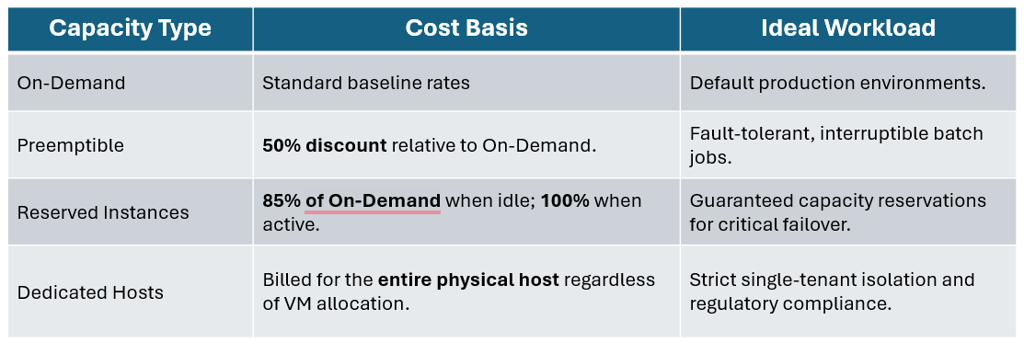
Capacity: type is where the real cost strategy lives, and there are four options.
Optimization via Autoscaling
Choosing the right shape and capacity type gets you most of the way to a well-priced compute footprint, but the biggest ongoing lever, in my experience, is autoscaling, because it removes the human delay between load dropping and someone actually scaling down. On OCI, autoscaling for Compute means horizontal scaling specifically: automatically provisioning or terminating whole instances, not resizing an existing machine's shape. It runs on two distinct rule types, and mature environments tend to run both together rather than choosing one.
Schedule-based: autoscaling fires on a time basis, either a one-time event or a recurring pattern, and it's the right tool when demand is predictable rather than reactive. A government payroll system that only sees real traffic during business hours can scale out at 9 AM and back in at 5 PM automatically, with zero metric-watching required, because the pattern is known in advance rather than discovered live.
Metric-based: autoscaling is the reactive counterpart. Compute instances constantly broadcast their own CPU and memory utilization into a metrics stream, the same kind of telemetry pipeline that feeds the usage ledger described earlier, and autoscaling rules can be built directly against that data. Setting one up means working through a handful of settings in sequence:
A cooldown period, which is how long the system waits after taking a scaling action before it's allowed to take another one (without it, a noisy metric could send the system into a provisioning-and-deprovisioning loop that costs more than it saves).
The metric itself: CPU or memory utilization.
A scale-out rule, a utilization threshold, and how many instances to add once average usage crosses it.
A scale-in rule operating the same way in reverse.
Scaling limits, Minimum and maximum instance limits matter more than they might seem at first, because they're what keeps the worst-case cost of an autoscaled environment bounded and known in advance, no matter how aggressively the metric-based rules end up firing.
Storage Pricing.
Object Storage:
Object storage costs are driven by storage capacity, API transaction volume, and network egress. OCI divides this into two distinct availability tiers:
Standard Tier:
For frequent and immediate access, the highest cost.
Archive Tier:
Optimized for deep compliance retention. It offers the lowest storage rates, though data retrieval takes hours and requires a 90-day minimum retention period. Deleting data before minimum retention periods expire results in a prorated penalty charge.
Object Storage Cost Calculation:
Storage Size: you pay Per Gigabyte monthly; for the archive tier, the rate is much lower.
Network: First 10 TB egress monthly is free
Transactions: First 50,000 REQUESTS monthly ARE free, then pay per 10,000
Financial Efficiency
To optimize object storage spend, organizations can implement one of two mutually exclusive management models:
Lifecycle Management: Deterministic, time-based rules that cascade objects from left to right across tiers or trigger permanent deletion based on file age or naming prefixes (e.g., moving '/logs' to Archive after 1 day).
Auto-Tiering: Algorithmic optimization that continuously analyzes access patterns and seamlessly shifts objects between Standard and Infrequent Access based on active demand. Crucially, Auto-Tiering automatically bypasses the standard 31-day minimum retention penalties.
** The one constraint worth knowing is that auto-tiering and a lifecycle rule that also moves objects into infrequent access can't coexist on the same bucket. You use one mechanism or the other for that particular transition, not both at once.
Block Storage:
OCI Block Volumes separate storage capacity from performance overhead. Total volume cost is calculated as :
Total Cost = Capacity Cost+ Performance Cost
Object Storage Cost Calculation:
CAPACITY OR storage size: billed at a flat rate per gigabyte per month
Performance: measured in Volume Performance Units, or VPUs, and a single VPU tier simultaneously sets four separate performance ceilings on the volume: IOPS per gigabyte of capacity, maximum IOPS for the whole volume, throughput in kilobytes per second per gigabyte, and maximum throughput in megabytes per second for the whole volume.
Lower Cost (0 VPUs): Tailored for large, infrequently accessed archival data or detached storage.
Balanced (10 VPUs): The baseline performance tier for standard production workloads.
Higher / Ultra High Performance (20 to 120 VPUs): Scaled increments adding significant IOPS and throughput capabilities for demanding databases.
Financial Efficiency
Because block storage performance can represent a large portion of overall storage costs, OCI features Block Volume Auto-Tuning. When enabled, this feature automatically downgrades detached volumes to the Lower Cost tier after 14 days of inactivity, instantly scaling them back to their target performance baseline the moment they are reattached to a compute instance.
File Storage:
OCI File Storage (FSS) provides a fully managed, automatically scaling network file system priced at a flat per-gigabyte-per-month rate. Beyond raw file data, billing calculations include two technical factors:
Metadata Overhead: Directories consume 512 bytes each, and symbolic links consume 8,192 bytes.
Snapshots and Clones: FSS utilizes a hardware-replicated, Copy-on-Write architecture for versioning. When a snapshot or clone is created, it points to the original blocks and incurs no immediate cost. Charges accumulate only as data diverges, meaning you are billed exclusively for the differentiated data blocks altered over time.
Network Pricing.
Data transfer costs within OCI are straightforward, prioritizing predictable pricing over hidden fees:
Inbound & Intra-Region Data: All data ingress into an OCI region, as well as all traffic between Availability Domains (ADs) and Fault Domains within a region, is completely free.
Outbound Egress: Outbound traffic leaving an OCI region is free for the first 10 terabytes per month per tenancy. Beyond this threshold, tiered rates apply based on the geography of the originating region. For instance, egress from North America and Europe is priced lower than traffic exiting the Asia-Pacific region, South America, or the Middle East.
Hybrid Connectivity Economics
IPSec VPN: The managed OCI VPN service carries no provisioning or hourly fees, though outbound traffic across the tunnel is subject to standard OCI egress pricing.
FastConnect: Dedicated, private network circuits are billed at a flat, predictable rate per port hour based on fixed capacity speeds (1 Gbps, 10 Gbps, or 100 Gbps). Because you lease the physical port infrastructure, all data egress over FastConnect is entirely free of metering charges.
Enterprise Software Licensing Frameworks.
Deploying enterprise applications on OCI requires balancing cloud infrastructure costs with software license compliance. OCI addresses this through two primary models: License Included and Bring Your Own License (BYOL).
OCI Marketplace Deployments
The OCI Marketplace offers ready-to-deploy software architectures operating under three billing methods:
Free Stack Images: The software itself carries no licensing overhead; billing is limited strictly to the underlying OCI infrastructure consumed.
BYOL Images: Tailored under the assumption that the customer holds valid, mobilizable software entitlements. Oracle bills exclusively for the compute and storage resources.
Paid (License Included) Images: Premium, turnkey stacks where OCI bundles both the infrastructure and software licensing costs into a unified hourly or per-second billing rate.
Oracle Database Cloud Entitlements
When provisioning managed Database services, selecting License Included grants access to the full matrix of database options alongside fully integrated Oracle Support at no additional charge. Conversely, selecting BYOL allows you to leverage existing on-premises core licenses, though you must maintain your existing active support streams separately to remain compliant.
Windows Server (License Included)
Oracle provides official Windows platform images via an on-demand licensing model metered per OCPU per second. Crucially, billing occurs only while the instance is in a running state. Architects can leverage automation scripts via the OCI CLI to pause non-production instances during off-peak hours, capturing significant software licensing savings. For dense virtualization, organizations can deploy a bare-metal compute instance running a Windows Server Datacenter platform image, unlocking unlimited guest VM instances nested via Hyper-V on that specific host.
Windows Server and Application BYOL
To bring existing Microsoft entitlements to OCI, specific rules apply:
Infrastructure Restriction: Bringing your own Windows Server license is supported exclusively on bare-metal hardware using a custom hypervisor image (such as KVM) sourced from the Marketplace.
Compliance Framework: Customers must be actively enrolled in the Microsoft License Mobility through Software Assurance program. This framework governs the validation and legal transport of Windows Server, SQL Server, Exchange, System Center, and SharePoint entitlements onto OCI infrastructure.
Conclusion
Maximizing the return on an OCI investment requires aligning its technical capabilities with its economic models. By combining reactive boundaries like quotas with the optimization of block storage auto-tuning and automated object lifecycles, organizations can eliminate waste.
Furthermore, aligning workload profiles with the correct licensing approach, whether leveraging running-state Windows compute metering or capitalizing on existing database investments via BYOL, ensures a compliant, high-performance architecture.
Useful Links.
© 2026. All rights reserved.
Stay Updated
Get the latest posts on OCI and cloud tech